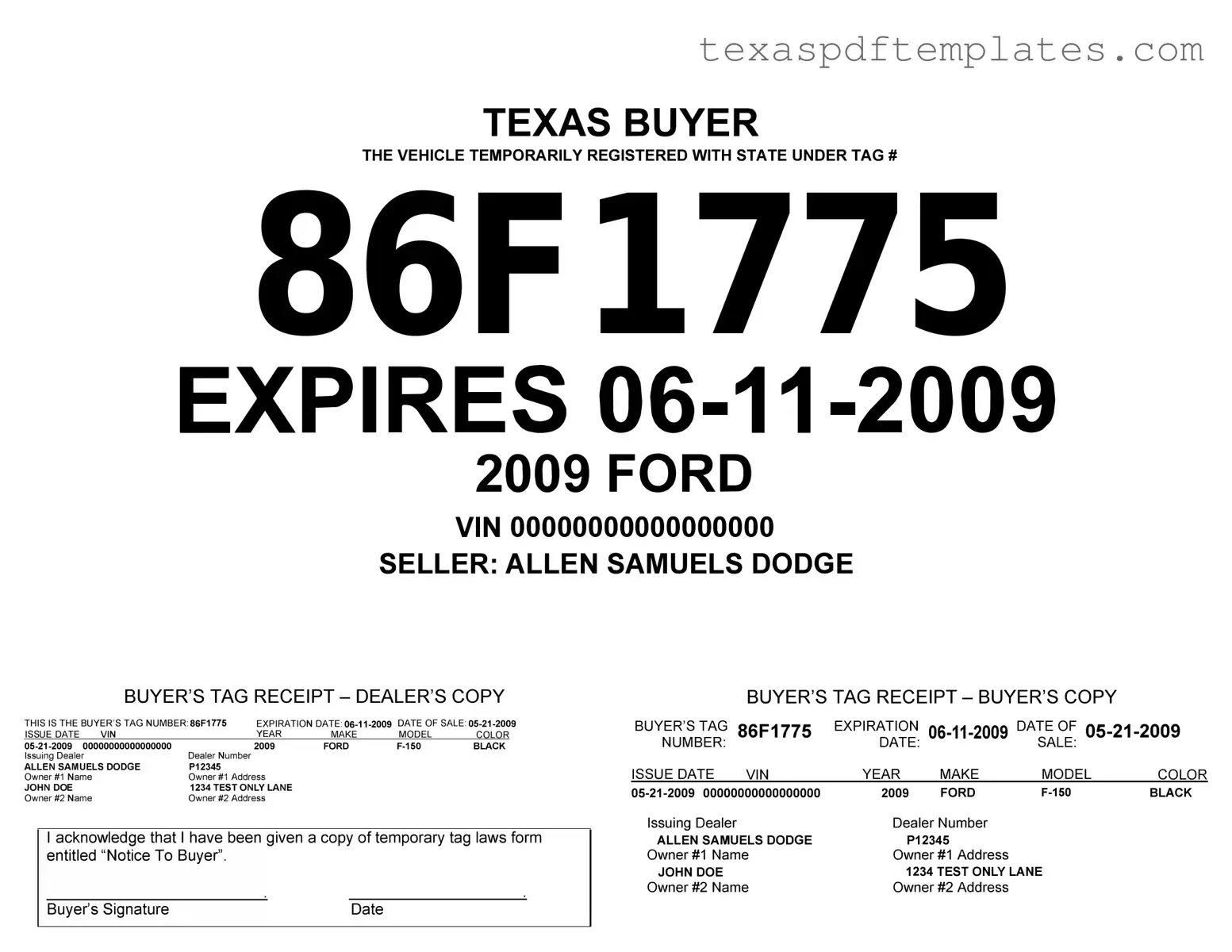
Blank Texas Temporary Tag PDF Template
Form Example

TEXAS BUYER
THE VEHICLE TEMPORARILY REGISTERED WITH STATE UNDER TAG#
86F1775
EXPIRES
2009 FORD
VINOOOOOOOOOOOOOOOOO
SELLER: ALLEN SAMUELS DODGE
BUYER'S TAG RECEIPT - DEALER'S COPY
THIS IS THE BUYER'S TAG NUMBER86F1775 |
EXPIRATION DATE: |
||||||
ISSUE DATE |
VIN |
|
YEAR |
MAKE |
MODEL |
COLOR |
|
Dealer Number |
2009 |
FORD |
BLACK |
||||
Issuing Dealer |
|
|
|
|
|
|
|
ALLEN SAMUELS DODGE |
P12345 |
|
|
|
|
|
|
Owner #1 Name |
|
Owner #1 Address |
|
|
|
|
|
JOHN DOE |
|
1234 TEST ONLY LANE |
|
|
|
|
|
Owner #2 Name |
|
Owner #2 Address |
|
|
|
|
|
Iacknowledge that I have been given a copy of temporary tag laws form entitled "Notice To Buyer''.
|
BUYER'S TAG RECEIPT - BUYER'S COPY |
|
||||
BUYER'S TAG |
86F1775 |
EXPIRATION |
DATE OF |
|||
NUMBER: |
|
DATE: |
|
SALE: |
|
|
ISSUE DATE |
VIN |
YEAR |
MAKE |
MODEL |
COLOR |
|
2009 |
FORD |
|
BLACK |
|||
Issuing Dealer |
|
Dealer Number |
|
|
|
|
ALLEN SAMUELS DODGE |
P12345 |
|
|
|
||
Owner #1 Name |
Owner #1 Address |
|
|
|
||
JOHN DOE |
|
1234 TEST ONLY LANE |
|
|
||
Owner #2 Name |
Owner #2 Address |
|
|
|
||
Buyer's Signature |
Date |
|
|
More PDF Templates
Short Form Birth Certificate Texas - If you need the record for passport or immigration purposes, this must be noted.
Texas Ap 152 - The AP-152 is revised periodically, so staying updated on changes is important.
Common mistakes
-
Incorrect Vehicle Information: Many people fail to provide accurate details about the vehicle, such as the make, model, year, and VIN. Double-checking this information is crucial to avoid delays.
-
Missing Signature: Some applicants forget to sign the form. A missing signature can lead to the rejection of the application, so it’s important to ensure that all required signatures are included.
-
Wrong Fees: Submitting the incorrect fee amount can cause processing issues. It’s essential to verify the current fee structure before sending in the form.
-
Incomplete Contact Information: Providing insufficient contact information can hinder communication. Ensure that your phone number and email address are clearly listed and accurate.
-
Incorrect Purpose of Use: Some individuals misidentify the purpose for needing a temporary tag. Clearly stating the reason helps in processing the request more efficiently.
-
Failing to Include Supporting Documents: Applicants sometimes forget to attach necessary documents, such as proof of insurance or identification. Check the requirements carefully to avoid missing anything.
-
Not Using Black or Blue Ink: Filling out the form in colors other than black or blue can lead to issues with legibility. Stick to these colors to ensure clarity.
-
Neglecting to Review the Form: Skimming through the form before submission can result in overlooked errors. Take a moment to review all entries for accuracy.
-
Submitting Late: Some individuals wait until the last minute to submit their forms. Early submission is advisable to avoid potential delays or penalties.
Key takeaways
When filling out and using the Texas Temporary Tag form, there are several important points to keep in mind. Here are five key takeaways:
- Eligibility Requirements: Ensure that the vehicle is eligible for a temporary tag. This typically applies to newly purchased vehicles or those awaiting registration.
- Accurate Information: Fill out the form with accurate details, including the vehicle identification number (VIN), make, model, and owner information. Errors can lead to delays or complications.
- Time Limit: Temporary tags are valid for a limited period, usually 30 days. Make sure to complete the registration process before the tag expires to avoid fines.
- Fees: Be aware of any fees associated with obtaining a temporary tag. These fees can vary, so check with your local county tax office for specific amounts.
- Display Requirements: Properly display the temporary tag on your vehicle. It should be placed in the rear window or another designated area as specified in the guidelines.
By following these key points, you can ensure a smoother experience when using the Texas Temporary Tag form.
Steps to Using Texas Temporary Tag
Completing the Texas Temporary Tag form is an important step for individuals needing temporary vehicle registration. After filling out the form, you will submit it to the appropriate authority, which will process your request and issue the temporary tag. Follow the steps below to ensure you fill out the form correctly.
- Begin by entering your name in the designated field at the top of the form.
- Provide your address, including street, city, state, and ZIP code.
- Fill in your phone number to ensure contact if needed.
- Input the vehicle identification number (VIN) of the vehicle you are registering.
- Specify the make and model of the vehicle.
- Indicate the year of the vehicle.
- Choose the type of temporary tag you require from the options provided.
- Sign and date the form to confirm that all information is accurate.