Blank Texas Ps 106 PDF Template
Form Example
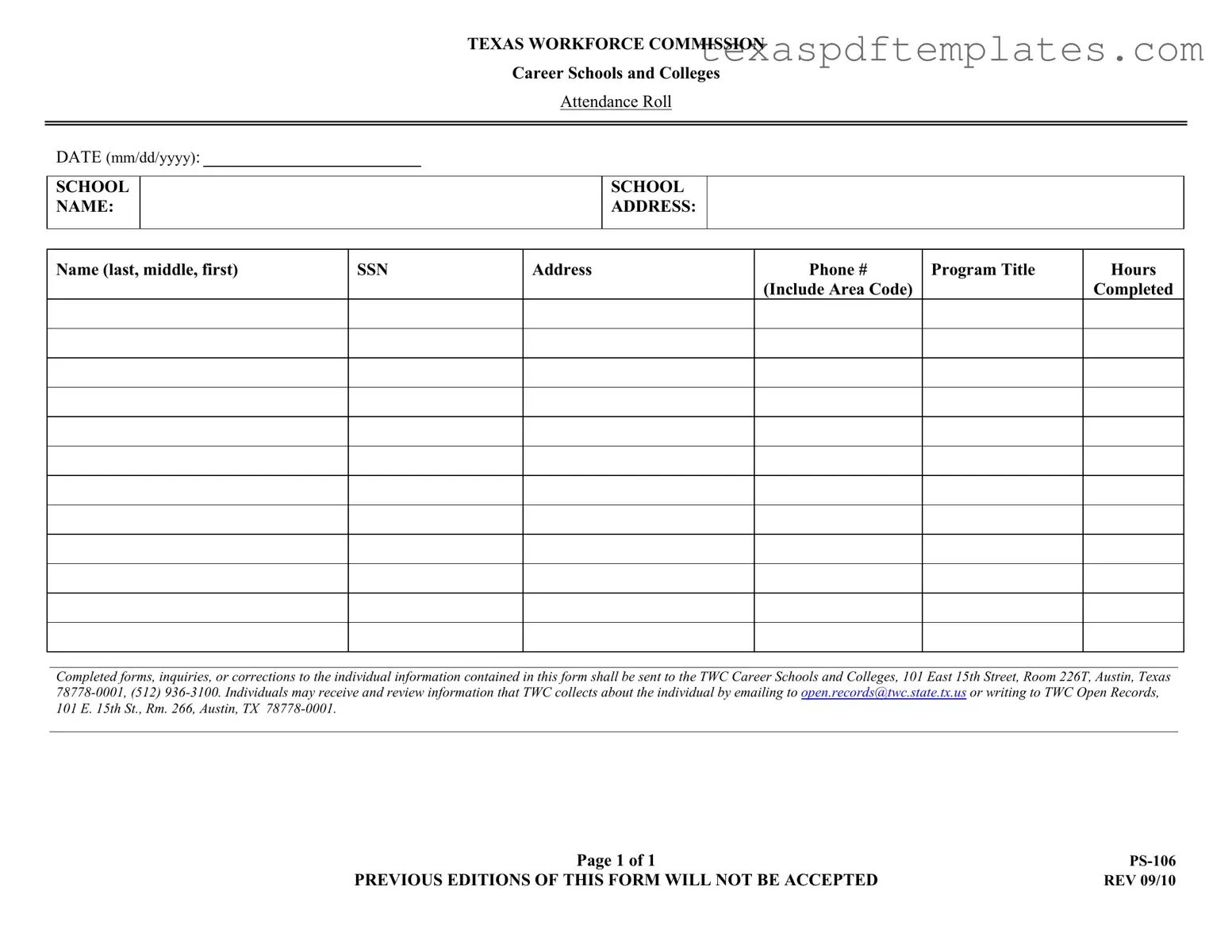
TEXAS WORKFORCE COMMISSION
Career Schools and Colleges
Attendance Roll
DATE (mm/dd/yyyy):
SCHOOL NAME:
SCHOOL ADDRESS:
Name (last, middle, first)
SSN
Address
Phone #
(Include Area Code)
Program Title
Hours
Completed
_______________________________________________________________________________________________________________________________________________________________
Completed forms, inquiries, or corrections to the individual information contained in this form shall be sent to the TWC Career Schools and Colleges, 101 East 15th Street, Room 226T, Austin, Texas
_______________________________________________________________________________________________________________________________________________________________
Page 1 of 1 |
|
PREVIOUS EDITIONS OF THIS FORM WILL NOT BE ACCEPTED |
REV 09/10 |
More PDF Templates
Snap Benefit Review Form - Report all sources of income for each person living in your home.
Class Forms - Individuals receiving services can express satisfaction or concerns via the Texas 3599 form.
Members of Texas (band) - Proof of ownership is necessary if the designated broker owns 10% or more of the entity.
Common mistakes
When filling out the Texas Ps 106 form, it’s important to avoid common mistakes that could delay processing or lead to incorrect information being recorded. Here are four frequent errors:
-
Incomplete Information:
Many individuals forget to fill in all required fields. Each section must be completed, including the date, school name, and student information. Omitting any details can result in the form being returned or delayed.
-
Incorrect Formatting:
Using the wrong format for dates or phone numbers can cause confusion. Ensure that the date is in the mm/dd/yyyy format and that phone numbers include the area code. This attention to detail is crucial for clear communication.
-
Neglecting to Review:
After filling out the form, some individuals fail to review their entries. Mistakes in spelling or numbers can easily be overlooked. Take a moment to double-check all information before submission.
-
Not Sending to the Correct Address:
It’s essential to send completed forms to the right location. The address for the Texas Workforce Commission is specified on the form. Sending it elsewhere can lead to significant delays in processing.
By being mindful of these common pitfalls, you can ensure that your Texas Ps 106 form is completed accurately and submitted successfully. This helps facilitate a smoother process and avoids unnecessary complications.
Key takeaways
When dealing with the Texas Ps 106 form, there are several important aspects to keep in mind. This form is essential for recording attendance in career schools and colleges across Texas. Here are some key takeaways to consider:
- Purpose of the Form: The Texas Ps 106 form is used to document student attendance at career schools and colleges, ensuring compliance with state regulations.
- Accurate Information: It is crucial to fill out the form with accurate and complete information, including the student's full name, Social Security Number, and contact details.
- School Information: Make sure to include the school's name and address at the top of the form. This helps in identifying the institution associated with the attendance record.
- Program Title: Clearly specify the program title under which the student is enrolled. This provides context for the attendance being recorded.
- Hours Completed: Record the total hours the student has completed accurately. This is important for tracking progress and meeting program requirements.
- Submission Guidelines: Completed forms must be sent to the Texas Workforce Commission's Career Schools and Colleges division at the specified address.
- Reviewing Information: Students have the right to review the information collected about them. They can do this by contacting the Texas Workforce Commission via email or mail.
- Form Validity: Only the current version of the form is accepted. Previous editions will not be processed, so ensure you are using the most recent version.
By keeping these points in mind, you can ensure that the Texas Ps 106 form is filled out correctly and used effectively. This will help maintain compliance and support students in their educational journeys.
Steps to Using Texas Ps 106
Completing the Texas Ps 106 form is essential for accurate record-keeping at career schools and colleges. This form requires specific personal information and details about your educational program. Follow the steps below to ensure that you fill it out correctly.
- Begin by entering the date in the format mm/dd/yyyy at the top of the form.
- Next, write the school name clearly in the designated space.
- Fill in the school address, including street, city, state, and zip code.
- Provide your name in the order of last name, middle name, and first name.
- Enter your Social Security Number (SSN) in the appropriate field.
- Input your address, ensuring to include the street, city, state, and zip code.
- List your phone number, including the area code.
- Specify the program title that you are enrolled in.
- Finally, indicate the hours completed in your program.
Once you have filled out the form, be sure to review it for accuracy. After confirming that all information is correct, submit it as required. If you have any inquiries or need to make corrections, follow the contact details provided on the form.